Animal Reports Studio
new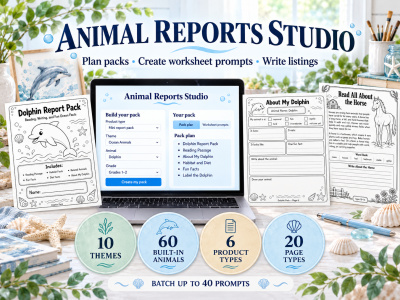
🐾📝 Animal Reports Studio 📝🐾
Animal Reports Studio replaces the Animal Reports Studio GPT Bundle. If you purchased the original GPT bundle or are in Printables Business Academy, you will receive this Studio as your replacement. Please do not buy it again.
Your animal report planning and worksheet prompt Studio for turning one animal idea into coordinated printable products without writing every image prompt from scratch!
Calling all PLR sellers and printable creators!
✨ Start with one animal and see how many product possibilities grow from it. Create a simple report pack, plan a larger research project, or build a coordinated collection around a theme your customers will love.
Animal Reports Studio was created for printable sellers who want help moving from an idea to a page-by-page plan and detailed, ready-to-copy worksheet prompts.
Choose what you want to create, select your animal and grade level, customize the look, and let the Studio help you build from there. Once your finished product is ready, it can help you prepare your listing copy, too.
Come back whenever you’re ready to explore another animal, theme, or product direction. 🐾
💡 Why You Need Animal Reports Studio 💡
An animal report doesn’t have to be a one-page product. One idea can grow into a series of coordinated activities, grade-level versions, or an entire themed collection.
Animal Reports Studio helps you organize your ideas and turn your choices into detailed prompts you can use with your favorite AI image generator.
It’s a tool you can return to whenever you need a new direction for your Etsy shop, PLR store, classroom printable collection, or digital product bundle.
💡 Here’s What’s Inside Animal Reports Studio 💡
- 🌿 10 Animal Themes
- 🐾 60 Built-In Animals, plus the option to add your own
- 📦 6 Product Types
- 📝 20 Page Types and batches of up to 40 prompts
Mix and match your choices to create products that fit your shop and your audience.
Products You Can Easily Plan With It:
- 1️⃣ Animal Report Packs — create a coordinated set around one animal.
- 2️⃣ Animal Research Projects — plan a more in-depth learning experience.
- 3️⃣ Reading and Activity Packs — pair animal learning with related activities.
- 4️⃣ Themed Animal Collections — build individual products that can grow into a larger bundle.
Help Your Customers Explore the Animal World ✨
Imagine beginning with one dolphin report idea and turning it into a collection of ocean animal products. Or starting with a farm animal activity and building matching reports for other animals in the same theme.
Instead of creating unrelated pages one at a time, you can plan a product with a consistent direction and keep building from it.
Animal Reports Studio helps you take one animal idea and see where it could go next.
🛠️ What You Can Create With Animal Reports Studio 🛠️
- 🐬 Ocean, farm, woodland, safari, and other animal-themed printables
- 📖 Report, research, reading, and activity products
- 🎨 Coordinated products for different animals or grade levels
- 🛍️ Printable collections and PLR/MRR product ideas for your shop
🌿 Animal Themes You Can Explore 🌿
You aren’t limited to one kind of animal report.
Choose from ten built-in themes and sixty animals, or bring an animal idea of your own. You can keep working within one theme to build a matching collection, then change direction when you’re ready to create something new.
One Studio can help you explore many different animal product ideas.
📐 Choose the Product Direction You Want
Start with the type of product you want to make, then choose the pages that belong in it.
You can follow the suggested pack plan or adjust it to fit your idea. Select a grade level and a visual direction that make sense for the children who will use the finished product.
That means every animal pack doesn’t have to look or function exactly the same.
🔒 Lock What You Love. Change What You Don’t. 🔒
Found a look you love but want to try another animal?
Want to keep your favorite design choices while exploring a new color or layout?
Lock the selections you want to keep, then try new combinations around them. It’s a simple way to create variety while keeping a collection visually connected.
📦 Create One Prompt or Build a Collection 📦
Need a prompt for one worksheet page? Start there.
Working on a complete product? Create prompts for your selected pages, explore variations, and save the ideas you want to use again.
With batches of up to 40 prompts, Animal Reports Studio gives you room to experiment and plan beyond a single page.
🤖 Use Your Favorite Image Generator 🤖
Animal Reports Studio prepares the worksheet prompts for you. Copy a prompt and use it with your preferred AI image generator to create the page.
You do not need to sign into Claude to use the Studio’s planning and worksheet prompt features. Simply click your access link and open it in your browser. Claude’s AI-written listing feature may require opening the artifact in Claude.
The Studio creates plans and prompts; you create and check the finished printable pages.
🎁 How It Works 🎁
Choose the animal product you want to create.
Select your theme, animal, grade level, pages, and design direction.
Copy your worksheet prompts and use them with your image generator. Once you’ve completed and checked your product, use the Studio to help prepare its listing copy.
Create one pack, save the choices you love, and return when you’re ready for the next idea.
📌 LICENSE DETAILS
The Animal Reports Studio itself is for the purchaser’s personal use only.
- YES You may use the plans and prompts generated by Animal Reports Studio to create your own finished products.
- YES Finished printables and other products you create using those prompts may be sold through your own business.
- YES You may edit, customize, brand, bundle, and package the finished products you create.
- NO You may not reproduce, share, resell, copy, distribute, transfer, or give others access to Animal Reports Studio itself.
You may not share or resell the Animal Reports Studio access link, code, setup, instructions, or internal structure, and you may not pass the Studio itself on to your customers.
The finished products you create are yours. Animal Reports Studio itself is not transferable.
Everything is copyrighted by Mom’s Digital Boutique and Marcy Patterson.
Note: You will receive access to your product in your theunpopularmom.com account once you complete checkout. As this is an instantly accessible digital product, sales are final and no refunds are offered.
If You Have a COUPON
Add the product to your basket and apply your coupon before checking out.
You’ll find your basket in the sidebar on desktop or by scrolling down on a mobile device.
You will gain access to the link and instructions in your aMember dashboard as soon as your payment processes.
All sales are final.